Why YouTube Thumbnails Are Your Most Important Asset
YouTube processes over 3.7 million new videos every single day. In a content ocean that vast, your thumbnail is the lifeboat that pulls viewers aboard — or lets them drift past. A well-designed thumbnail can increase your click-through rate (CTR) by 30% or more, making it the single highest-ROI visual asset you will ever create for your channel. Yet a surprising number of creators upload thumbnails that are blurry, poorly cropped, or outright invisible on certain devices.
YouTube displays thumbnails across an astonishing range of screen sizes: from a 4-inch phone in vertical mode to an 85-inch living room TV. An image that looks crisp on your laptop may become a pixelated smear on a Retina tablet or a fuzzy blob on a smart TV. Getting the dimensions right from the start is the only way to guarantee your thumbnail looks professional everywhere.
Unlike Instagram where you are designing for a mobile-first audience, YouTube viewers watch on desktop (roughly 35%), mobile (roughly 55%), and TV (roughly 10%). Your thumbnail must read well at postage-stamp size in the sidebar "Up Next" section and at full 4K resolution on a large screen. This requires a fundamentally different approach than designing for TikTok or Instagram.
Official YouTube Thumbnail Dimensions
Standard Thumbnail Size
Recommended: 1280 × 720 pixels (16:9 aspect ratio). This is YouTube's officially recommended resolution, and it is non-negotiable if you want your thumbnails to look sharp everywhere. The 1280 × 720 dimension matches the standard HD video resolution, which means YouTube never needs to stretch or interpolate your thumbnail — it renders natively on 720p and scales cleanly to 1080p, 1440p, and 4K displays.
The minimum accepted size is 640 × 360 pixels, but using this bare-minimum resolution is a mistake. At 640 × 360, text becomes illegible on mobile search results where thumbnails render at roughly 168 × 94 pixels per column. Likewise, on TV screens, a 640px thumbnail will be upscaled aggressively, resulting in noticeable blur. Always upload at 1280 × 720. The extra resolution costs you nothing in terms of file size if you compress intelligently and pays massive dividends in visual quality.
YouTube imposes a 2MB file size limit for thumbnails. At 1280 × 720, this is rarely a problem for well-optimized images. A high-quality JPG at 85-90% quality typically lands between 150KB and 400KB, giving you headroom to include detailed graphics, photos, and text without hitting the ceiling. If you do approach 2MB, use Image Toolbox's compression tool to reduce file size without visible quality loss.
Safe Zone and Composition Rules
Not every pixel of your 1280 × 720 thumbnail is equally visible. YouTube crops thumbnails differently depending on where they appear:
- Search results and sidebar: Thumbnails display at approximately 168 × 94 pixels. Fine details, small text, and subtle gradients vanish entirely at this scale. Your composition must work as a tiny preview, not just at full size.
- TV and large screens: Thumbnails can display at up to 1280 × 720 native resolution. Pixel-level flaws — compression artifacts, jagged edges, poorly masked cutouts — become glaringly obvious on a 65-inch screen.
- Time duration overlay: YouTube places a timestamp in the bottom-right corner of every thumbnail, covering roughly 60 × 20 pixels. Never place critical visual information in that area.
The thumb-rule for composition is simple: design for the smallest size, polish for the largest. Squint at your thumbnail from across the room. If the core message — a face, a bold number, a key object — is still readable, your composition works.

Design Tips for High-CTR YouTube Thumbnails
Getting the dimensions right is only half the battle. The design itself determines whether someone clicks. Here is what separates top-performing thumbnails from also-rans:
- Faces with emotion: Thumbnails featuring close-up human faces with exaggerated expressions — surprise, excitement, curiosity — consistently outperform abstract graphics. The face should occupy at least 30-40% of the frame. Make eye contact with the camera; viewers subconsciously connect with direct gazes.
- High contrast, limited palette: YouTube's interface is white in light mode and dark gray in dark mode. Your thumbnail should pop against both backgrounds. Use a limited color palette (2-4 colors) with high saturation. Avoid white backgrounds — they blend into light mode. Avoid black backgrounds — they disappear in dark mode. A vibrant yellow, electric blue, or bold red background reads well in both themes.
- Three-element rule: The most effective thumbnails contain exactly three visual elements: a face (or main subject), a bold text overlay (3-5 words max), and a background that provides context. More than three elements create visual clutter; fewer than three can look empty.
- Text that survives shrinking: Use sans-serif fonts at no smaller than 72pt equivalent on a 1280px canvas. Keep text to under 5 words. Test readability by viewing your thumbnail at 20% zoom — if you cannot read it, neither can a mobile user scrolling through search results.
If you are managing multiple social channels — YouTube, TikTok, Instagram, Facebook — the dimensional differences between platforms can drive you crazy. A 1280 × 720 YouTube thumbnail does not work as a 1080 × 1920 TikTok cover, and neither fits Instagram's 1080 × 1350 feed format. You can use Image Toolbox's Social Media Compliance Checker to batch-generate correctly sized thumbnails for every platform from a single source image. It validates every export against each platform's latest specifications, saving hours of manual resizing.
For precise thumbnail editing, the resize tool locks your image to exact 1280 × 720 dimensions while the crop tool helps you reframe compositions to 16:9. Both run entirely in your browser — your creative work never leaves your computer.
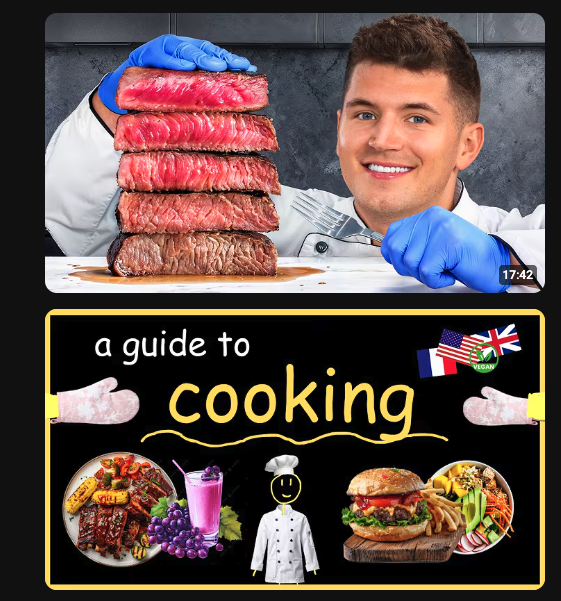
Thumbnail A/B Results
Human faces: 30% more clicks. 1280×720 optimal. Auto-generated thumbs perform 40% worse.